SEO for Beginners: On-Page Optimization Guide 2026
Learn practical on-page SEO techniques for 2026. A beginner-friendly guide covering content, keywords, user experience, and rankings.
Anudeep Hegde
5/28/20267 min read
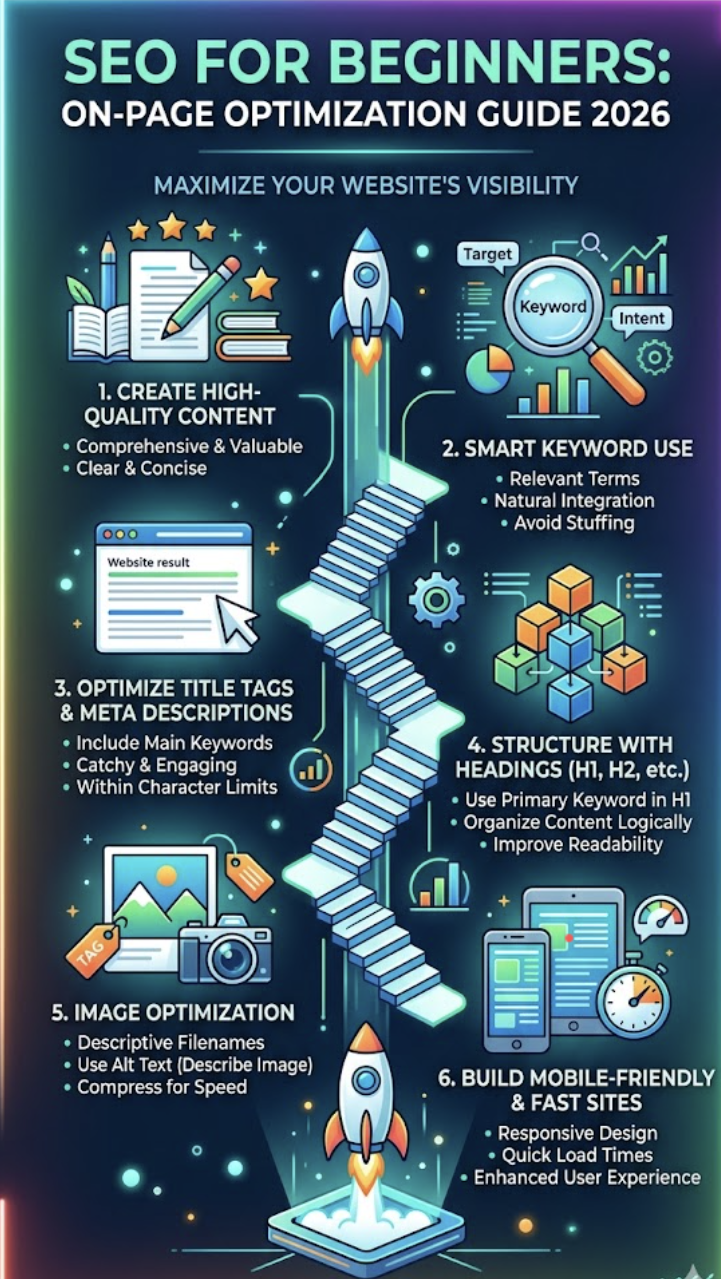
SEO for Beginners: On-Page Optimization Guide 2026
If you're starting your SEO journey in 2026, you've probably heard countless opinions about rankings, algorithms, AI, keywords, and search engines. Some people make SEO sound complicated. Others promise overnight success. In reality, effective SEO is much simpler than most people think.
Over the last 12+ years working in internet marketing and hotel marketing, I've learned one important lesson: search engines reward websites that genuinely help people.
Whether I'm helping a coastal resort in Byndoor attract more guests, assisting a local business improve online visibility, or optimizing my own website, the foundation remains the same—strong on-page SEO.
In this beginner-friendly guide, I'll walk you through the most important on-page optimization techniques that continue to matter in 2026. These are practical strategies you can implement today, even if you're completely new to SEO.
By the end of this article, you'll understand:
What on-page SEO really means
How to optimize pages for both users and search engines
Common mistakes beginners make
The role of content, keywords, and user experience
A simple framework to improve rankings consistently
Let's get started.
[Image Suggestion: Laptop showing website analytics with a scenic Coastal Karnataka backdrop]
What is On-Page SEO?
On-page SEO refers to all the optimizations you make directly on your website to improve visibility in search engines and provide a better experience for visitors.
Think of your website like a hotel.
You may have the best property in the region, but if guests cannot find the reception, understand the facilities, or navigate the premises, they may leave disappointed.
The same applies online.
Search engines want to understand:
What your page is about
Whether the content is useful
How easy it is to navigate
Whether users have a positive experience
On-page SEO helps answer those questions.
Key Elements of On-Page SEO
Content quality
Keyword optimization
Page titles
Meta descriptions
Heading structure
Internal linking
Image optimization
Mobile usability
Page speed
User experience
When these elements work together, your chances of ranking improve significantly.
Why On-Page SEO Matters More Than Ever in 2026
Search engines have become smarter every year.
Today, ranking isn't simply about inserting keywords multiple times.
Modern SEO focuses on:
Search intent
Content quality
User experience
Expertise and credibility
Helpful information
Google's Search Quality Evaluator Guidelines continue emphasizing E-E-A-T:
Experience
Expertise
Authoritativeness
Trustworthiness
This means real-world experience matters.
For example, if I write about hotel marketing, I can draw upon years of working with hospitality businesses across Karnataka. That firsthand knowledge creates more value than generic advice copied from elsewhere.
The same principle applies to your niche.
The Human Side of SEO
Growing up in Coastal Karnataka taught me something valuable.
People trust recommendations from those who have actually experienced something.
Whether it's choosing a restaurant in Kundapura, selecting a school for children, or booking a family vacation, trust influences decisions.
Search engines increasingly operate the same way.
Your content should demonstrate real understanding and genuine usefulness.
Keyword Research: The Starting Point of Every Page
Before creating content, you need to know what people are searching for.
Keywords remain important in 2026—but how we use them has evolved.
Primary Keyword
Your primary keyword is the main search phrase you want to rank for.
For this article, the primary keyword is:
SEO for Beginners
Secondary Keywords
Related terms may include:
On-page SEO guide
On-page optimization
SEO techniques
SEO checklist
Beginner SEO tips
Website optimization
SEO best practices
Where to Use Keywords Naturally
Include your primary keyword in:
Page title
URL
Introduction
H2 headings where relevant
Meta description
Image alt text
Conclusion
Avoid forcing keywords unnaturally.
A good rule:
Write for humans first and search engines second.
Common Keyword Mistake
Many beginners still stuff keywords repeatedly.
Instead of writing:
"SEO for beginners is the best SEO for beginners guide because SEO for beginners helps beginners."
Write naturally:
"This guide explains the essential SEO principles beginners need to understand before optimizing a website."
The second version reads better and provides more value.
[Image Suggestion: Keyword research dashboard with search terms and content planning notes]
Create Content That Solves Real Problems
Content remains the heart of on-page SEO.
No technical trick can compensate for weak content.
Ask Yourself Three Questions
Before publishing, ask:
Does this solve a real problem?
Is the information accurate?
Would I share this with a friend?
If the answer is yes, you're moving in the right direction.
Content Structure Matters
Readers scan before they read.
Use:
Short paragraphs
Clear headings
Bullet points
Numbered lists
Tables when useful
For example:
Weak ContentStrong ContentLong blocks of textEasy-to-scan sectionsGeneric adviceSpecific examplesNo structureLogical headingsRepetitionActionable insights
Add Personal Experience
One thing I've noticed while working with hotels across Karnataka is that the most successful websites don't simply describe services.
They answer questions.
A beach resort doesn't just say "beautiful rooms."
It explains:
Who the rooms are for
What guests can expect
Nearby attractions
Seasonal travel tips
Specificity builds trust.
The same applies to every industry.
Optimizing Titles, Headings, and Meta Descriptions
These are often the first things users see in search results.
Title Tag Best Practices
A good title should:
Include the primary keyword
Be compelling
Stay under roughly 60 characters
Example:
SEO for Beginners: On-Page Optimization Guide 2026
Meta Description Tips
Your meta description should:
Summarize the page
Include the primary keyword
Encourage clicks
Think of it as a mini advertisement for your content.
Use Proper Heading Structure
A clean structure helps both readers and search engines.
Example:
H1: SEO for Beginners
H2: Keyword Research
H3: Finding Keywords
H3: Using Keywords Naturally
H2: Content Optimization
Avoid skipping heading levels unnecessarily.
Consistency improves readability.
Improve User Experience and Page Performance
SEO is no longer just about content.
User experience plays a major role.
Mobile-First Matters
According to StatCounter's global market share reports, mobile devices generate the majority of web traffic worldwide.
That means your website must perform well on smartphones.
Ask yourself:
Is text easy to read?
Are buttons easy to tap?
Do pages load quickly?
Is navigation simple?
Page Speed Optimization
Slow websites lose visitors.
Basic improvements include:
Compress images
Use modern image formats
Minimize unnecessary plugins
Enable caching
Choose quality hosting
Keep Navigation Simple
Think of a visitor arriving on your website for the first time.
Can they find important information within a few seconds?
If not, simplify.
One lesson from hospitality marketing is that reducing confusion often increases conversions more than adding new features.
Internal Linking
Internal links help visitors discover related content.
Examples:
Link blog posts together
Connect service pages
Link FAQs to detailed guides
Benefits include:
Better user experience
Improved crawlability
More page views
Stronger topical authority
[Image Suggestion: Mobile-friendly website displayed on smartphone and laptop]
Image Optimization: The Often-Ignored SEO Opportunity
Images contribute to both user experience and SEO.
Optimize File Names
Instead of:
IMG12345.jpg
Use:
seo-for-beginners-guide.jpg
Add Descriptive Alt Text
Alt text helps search engines understand images and improves accessibility.
Example:
"Website SEO optimization checklist displayed on laptop screen."
Compress Images
Large images slow websites.
Before uploading:
Resize appropriately
Compress files
Use WebP when possible
Use Relevant Images
Whenever possible:
Original photos
Real workplace images
Local business photos
Authentic experiences
People connect more with genuine visuals than stock photos.
As someone from Coastal Karnataka, I always appreciate seeing real places, real people, and authentic stories rather than overly polished marketing images.
Common On-Page SEO Mistakes Beginners Should Avoid
Over the years, I've seen the same mistakes repeated.
1. Writing Only for Search Engines
Remember:
People buy.
People book.
People share.
Not algorithms.
2. Ignoring Search Intent
Understand what users actually want.
Someone searching:
"How to improve website SEO"
Needs guidance—not a sales pitch.
3. Publishing Thin Content
A 300-word article rarely satisfies complex searches.
Aim for depth and usefulness.
4. Forgetting Internal Links
Many websites leave valuable pages disconnected.
Help visitors explore further.
5. Neglecting Updates
SEO is not a one-time task.
Review content regularly.
Update:
Statistics
Screenshots
Recommendations
Examples
6. Ignoring Local Relevance
Even global businesses benefit from local context.
For businesses in Karnataka, mention:
Local customer needs
Regional examples
Seasonal factors
Cultural relevance
Authenticity resonates.
A Simple On-Page SEO Checklist for 2026
Before publishing any page, review this checklist:
Content
✔ Solves a real problem
✔ Original and useful
✔ Easy to read
✔ Includes examples
Keywords
✔ Primary keyword in title
✔ Keyword in introduction
✔ Natural usage throughout content
✔ Secondary keywords included
Technical Elements
✔ Optimized URL
✔ Meta description added
✔ Proper heading structure
✔ Internal links included
User Experience
✔ Mobile friendly
✔ Fast loading
✔ Clear navigation
✔ Optimized images
Following this checklist consistently can dramatically improve your website over time.
The Bigger Lesson Behind SEO
One reason I enjoy SEO is that it mirrors many lessons from everyday life.
In Coastal Karnataka, we're surrounded by nature's reminders that meaningful growth takes time.
You don't plant a coconut tree today and expect fruit tomorrow.
You nurture it.
You stay patient.
You trust the process.
SEO works much the same way.
The websites that succeed are usually not the ones chasing shortcuts.
They're the ones creating value consistently.
They're helpful.
They're trustworthy.
They're built with people in mind.
And ultimately, that's what search engines want too.
[Image Suggestion: Coconut trees along the Karnataka coast symbolizing steady growth and long-term success]
Conclusion
If you're looking to master SEO for beginners in 2026, start with strong on-page optimization.
Focus on creating useful content, understanding search intent, optimizing page structure, improving user experience, and helping visitors find exactly what they need.
Don't get distracted by every new trend or algorithm update.
The fundamentals still matter.
Over my years working in digital marketing and hospitality marketing, I've found that websites grow when they consistently serve people well.
That's true for a local business in Byndoor, a hotel in Udupi, or an international brand.
Build trust.
Create value.
Stay patient.
The rankings will follow.
FAQs
1. What is on-page SEO?
On-page SEO refers to optimizing content and elements within your website to improve search engine visibility and user experience.
2. Is on-page SEO still important in 2026?
Yes. On-page SEO remains one of the most important ranking factors because it helps search engines understand your content and users navigate your website effectively.
3. How many times should I use a keyword?
There is no fixed number. Use keywords naturally where relevant and focus on readability rather than repetition.
4. What is the difference between on-page and off-page SEO?
On-page SEO involves optimizing your website itself, while off-page SEO focuses on external factors such as backlinks and brand mentions.
5. How long does SEO take to show results?
SEO is a long-term strategy. Results can vary depending on competition, content quality, website authority, and consistency.
6. Do images help SEO?
Yes. Properly optimized images improve user experience, accessibility, and can contribute to search visibility.
7. Is mobile optimization necessary for SEO?
Absolutely. Since most web traffic comes from mobile devices, mobile-friendly websites are essential for both users and search engines.
8. What is the most important SEO advice for beginners?
Focus on helping people first. Create useful content, answer real questions, and build a website that visitors genuinely enjoy using.
.
click link to know about LinkedIn Lead Generation Strategies for India
Anudeep Hegde
Seasoned Internet Marketing Specialist and Hotel Marketing Expert with over 14+ years of experience helping brands grow and succeed online.
Get in touch
connect@anudeephegde.com
Bangalore & Kundapura, India
© 2026. All rights reserved. @Trip Nirvigna Marketing
+91 9449507266, +91 9731258717