Technical SEO Checklist for New Websites
A practical technical SEO checklist for new websites. Learn how to build a strong SEO foundation, improve visibility, and avoid costly mistakes.
Anudeep Hegde
6/6/20266 min read
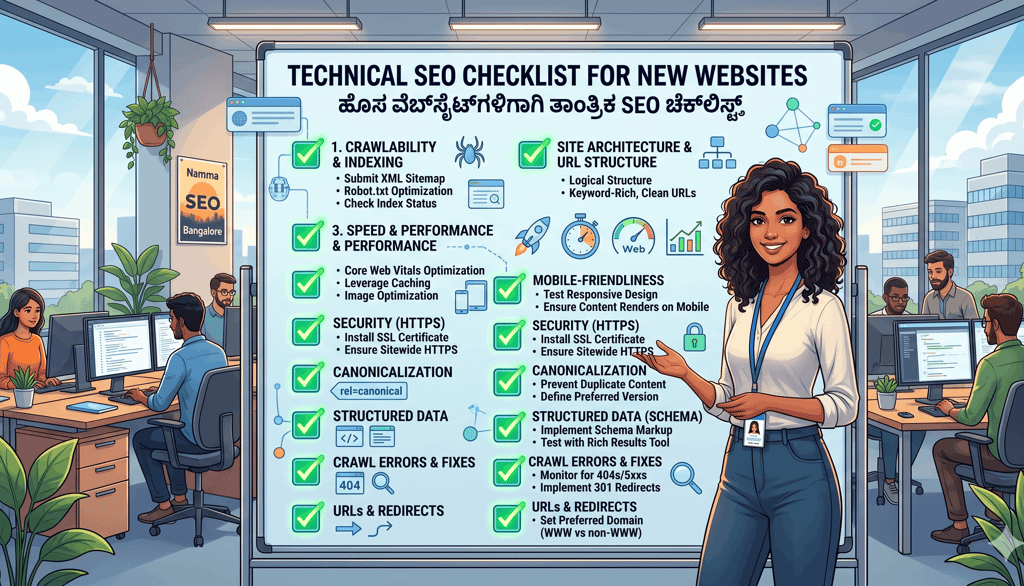
Technical SEO Checklist for New Websites
Launching a new website is exciting.
Whether it's a hotel website in Udupi, an eCommerce store in Mangalore, a local service business in Kundapura, or a personal brand website, there's a special feeling when you finally see your website live.
But over the years, I've noticed something interesting.
Many business owners spend weeks perfecting their logo, choosing colors, and writing content, yet completely overlook technical SEO.
The result?
A beautiful website that struggles to get found on Google.
As someone who has worked in digital marketing and hotel marketing for more than 12 years, I've seen this happen repeatedly. In many cases, businesses invest heavily in design and advertising only to discover later that search engines are having difficulty crawling, understanding, or indexing their website.
That's why having a proper technical SEO checklist for new websites is so important.
Think of technical SEO as the foundation of a house. If the foundation is weak, even the most attractive structure will eventually face problems.
In this guide, I'll walk you through the technical SEO checklist I recommend for every new website. These are practical steps that help search engines understand your site while creating a better experience for visitors.
[Image Suggestion: Website launch dashboard showing SEO setup checklist and analytics]
Why Technical SEO Matters Before Content Marketing
Many people think SEO starts with keywords.
In reality, SEO starts with accessibility.
Search engines need to:
Discover your website
Crawl your pages
Understand your content
Index your pages correctly
If any of these steps fail, even excellent content may struggle to rank.
Technical SEO Helps Search Engines Understand Your Website
Technical SEO improves:
Crawlability
Indexability
Site structure
Mobile usability
Website speed
Security
Google's Search Essentials documentation highlights the importance of making content accessible and crawlable for search engines.
It Saves Future Problems
Fixing technical issues before a website grows is usually easier than fixing hundreds of pages later.
I often compare this to building a home during Karnataka's monsoon season.
It's much easier to repair a roof before heavy rain arrives than after water starts leaking inside.
The same principle applies to websites.
Start with a Clean Website Structure
One of the most overlooked parts of technical SEO is website architecture.
Keep Navigation Simple
Visitors should reach important pages easily.
A typical structure may look like:
Home
→ Services
→ About
→ Blog
→ Contact
Avoid unnecessary complexity.
Create SEO-Friendly URLs
Good URLs are:
Short
Descriptive
Easy to read
Examples:
Good:
yourwebsite.com/hotel-marketing-services
Poor:
yourwebsite.com/page?id=47291
Organize Content Logically
Group related content together.
For example:
/seo-services/
/seo-services/local-seo/
/seo-services/technical-seo/
This structure helps both users and search engines.
[Image Suggestion: Clean website architecture diagram showing page hierarchy]
Set Up Essential Technical SEO Elements
Before promoting your website, ensure the fundamentals are in place.
Install SSL Security
Your website should use HTTPS.
Benefits include:
Improved trust
Better security
Search engine preference
Modern websites should never launch without SSL.
Create an XML Sitemap
An XML sitemap helps search engines discover pages efficiently.
Most SEO plugins can generate one automatically.
Submit Sitemap to Google Search Console
Google Search Console allows you to:
Monitor indexing
Track technical issues
Submit sitemaps
Review search performance
This should be one of the first tasks after launch.
Create a Robots.txt File
Robots.txt helps guide search engine crawlers.
It can:
Allow important content
Block unnecessary areas
Improve crawl efficiency
Care should be taken because incorrect settings can accidentally block your entire website.
Optimize Website Speed from Day One
Website speed affects user experience and SEO performance.
Google has repeatedly emphasized the importance of page experience and Core Web Vitals.
Common Speed Problems
Many new websites launch with:
Oversized images
Excessive plugins
Poor hosting
Heavy page builders
Speed Optimization Checklist
Compress Images
Use:
WebP format
Proper dimensions
Optimized file sizes
Choose Quality Hosting
Reliable hosting improves:
Server response times
Stability
Scalability
Enable Caching
Caching reduces server workload and improves loading times.
Minify CSS and JavaScript
Reducing file size improves performance.
Monitor Core Web Vitals
Pay attention to:
Largest Contentful Paint (LCP)
Interaction to Next Paint (INP)
Cumulative Layout Shift (CLS)
Tools like Google PageSpeed Insights can help identify opportunities.
Living in Coastal Karnataka has taught me to appreciate efficiency. Whether it's conserving water during summer or planning around monsoon weather, small optimizations often create significant benefits over time.
Websites work the same way.
[Image Suggestion: Fast-loading website speed meter with SEO performance indicators]
Make Mobile Optimization a Priority
Most website traffic today comes from mobile devices.
Google uses mobile-first indexing, meaning it primarily evaluates the mobile version of content for indexing and ranking.
Mobile SEO Checklist
Ensure your website:
✓ Uses responsive design
✓ Displays correctly on smartphones
✓ Has readable fonts
✓ Uses clickable buttons
✓ Loads quickly
✓ Avoids intrusive popups
Test Real User Experience
Don't rely only on automated tools.
Personally test your website on:
Android devices
iPhones
Different screen sizes
Various internet speeds
This often reveals issues that software tools miss.
In smaller towns and rural areas around Karnataka, users may browse on slower mobile networks. Optimizing for these users improves accessibility for everyone.
Improve Crawlability and Indexing
Search engines cannot rank pages they cannot access.
Check Indexing Status
Use Google Search Console regularly.
Look for:
Indexed pages
Excluded pages
Crawl errors
Coverage issues
Avoid Duplicate Content
Duplicate content can create confusion.
Examples include:
HTTP and HTTPS versions
WWW and non-WWW versions
Multiple URLs for the same page
Set Canonical URLs
Canonical tags tell search engines which version of a page is preferred.
Fix Broken Links
Broken links create poor user experiences.
Regularly audit:
Internal links
External links
Navigation menus
Create Internal Linking Structure
Internal links help:
Users navigate
Search engines understand content relationships
Pages pass authority
Strong internal linking is one of the simplest SEO wins available.
[Image Suggestion: Search engine crawler illustration analyzing website pages]
Implement Structured Data and Technical Enhancements
Structured data helps search engines better understand your content.
Useful Schema Types
Depending on your business, consider:
Organization Schema
Local Business Schema
Hotel Schema
FAQ Schema
Article Schema
Review Schema
Benefits of Schema Markup
Schema may help:
Improve visibility
Enhance search results
Clarify content context
Optimize Metadata
Every important page should include:
Title Tags
Keep titles:
Unique
Descriptive
Keyword relevant
Meta Descriptions
Write compelling descriptions that encourage clicks.
Header Tags
Use:
One H1
Logical H2 sections
Supporting H3 headings
This improves content organization.
Add Open Graph Tags
These help content display properly when shared on social media platforms.
Since much content is shared through WhatsApp and social networks, proper previews can improve engagement.
Technical SEO Maintenance Checklist
Technical SEO is not a one-time task.
It requires ongoing monitoring.
Monthly Tasks
Review Search Console
Check crawl errors
Test website speed
Monitor Core Web Vitals
Fix broken links
Quarterly Tasks
Audit structured data
Review mobile usability
Update plugins
Review hosting performance
Annual Tasks
Conduct full technical audit
Reassess website architecture
Review SEO strategy
Consistent maintenance prevents small issues from becoming major problems.
Technical SEO Reflects Good Digital Habits
Over the years, I've come to see technical SEO as more than a marketing task.
It's a reflection of discipline.
Growing up in Byndoor, I learned that small habits matter.
Keeping tools organized.
Maintaining equipment before it breaks.
Preparing for monsoon season before the first storm arrives.
These habits save time, effort, and stress later.
Technical SEO follows the same principle.
The businesses that perform best online are often not the ones chasing shortcuts. They're the ones that consistently maintain strong foundations.
Technology will continue to change.
Search engines will evolve.
AI will influence search behaviour.
But websites that prioritize accessibility, speed, usability, and technical quality will remain well positioned for the future.
[Image Suggestion: Professional website audit dashboard with SEO checklist and performance metrics]
Conclusion
Following a technical SEO checklist for new websites can save significant time, money, and frustration later.
Before investing heavily in content marketing, advertising, or link building, ensure your technical foundation is solid.
Focus on:
Website structure
Mobile optimization
Speed performance
Crawlability
Indexing
Security
Structured data
These foundational elements help search engines understand your website while creating a better experience for visitors.
In my experience, successful SEO rarely comes from one big breakthrough. It usually comes from getting the basics right and improving consistently over time.
Just like building a strong home or growing a healthy garden, long-term success begins with a solid foundation.
FAQs
1. What is technical SEO?
Technical SEO focuses on improving a website's infrastructure so search engines can crawl, index, and understand content effectively.
2. Why is technical SEO important for new websites?
It ensures search engines can discover and rank your pages while providing a better user experience.
3. What is an XML sitemap?
An XML sitemap is a file that helps search engines discover and understand the pages on your website.
4. Does website speed affect SEO?
Yes. Website speed contributes to user experience and is part of Google's page experience considerations.
5. What is mobile-first indexing?
Google primarily uses the mobile version of a website for indexing and ranking purposes.
6. What is schema markup?
Schema markup is structured data that helps search engines better understand website content.
7. How often should I perform a technical SEO audit?
At least annually, with ongoing monthly monitoring through Google Search Console and performance tools.
8. Can technical SEO alone improve rankings?
Technical SEO creates a strong foundation, but content quality, relevance, backlinks, and user experience also play important roles.
.
click here to know about Time Management Hacks for Busy Indian Entrepreneurs
Anudeep Hegde
Seasoned Internet Marketing Specialist and Hotel Marketing Expert with over 14+ years of experience helping brands grow and succeed online.
Get in touch
connect@anudeephegde.com
Bangalore & Kundapura, India
© 2026. All rights reserved. @Trip Nirvigna Marketing
+91 9449507266, +91 9731258717